 92b9de1428
Summary:
Reason:
To have one-step build for test android application based on the current code state that is ready for profiling with simpleperf, systrace etc. to profile performance inside the application.
## Parameters to control debug symbols stripping
Introducing /CMakeLists parameter `ANDROID_DEBUG_SYMBOLS` to be able not to strip symbols for pytorch (not add linker flag `-s`)
which is checked in `scripts/build_android.sh`
On gradle side stripping happens by default, and to prevent it we have to specify
```
android {
packagingOptions {
doNotStrip "**/*.so"
}
}
```
which is now controlled by new gradle property `nativeLibsDoNotStrip `
## Test_App
`android/test_app` - android app with one MainActivity that does inference in cycle
`android/build_test_app.sh` - script to build libtorch with debug symbols for specified android abis and adds `NDK_DEBUG=1` and `-PnativeLibsDoNotStrip=true` to keep all debug symbols for profiling.
Script assembles all debug flavors:
```
└─ $ find . -type f -name *apk
./test_app/app/build/outputs/apk/mobilenetQuant/debug/test_app-mobilenetQuant-debug.apk
./test_app/app/build/outputs/apk/resnet/debug/test_app-resnet-debug.apk
```
## Different build configurations
Module for inference can be set in `android/test_app/app/build.gradle` as a BuildConfig parameters:
```
productFlavors {
mobilenetQuant {
dimension "model"
applicationIdSuffix ".mobilenetQuant"
buildConfigField ("String", "MODULE_ASSET_NAME", buildConfigProps('MODULE_ASSET_NAME_MOBILENET_QUANT'))
addManifestPlaceholders([APP_NAME: "PyMobileNetQuant"])
buildConfigField ("String", "LOGCAT_TAG", "\"pytorch-mobilenet\"")
}
resnet {
dimension "model"
applicationIdSuffix ".resnet"
buildConfigField ("String", "MODULE_ASSET_NAME", buildConfigProps('MODULE_ASSET_NAME_RESNET18'))
addManifestPlaceholders([APP_NAME: "PyResnet"])
buildConfigField ("String", "LOGCAT_TAG", "\"pytorch-resnet\"")
}
```
In that case we can setup several apps on the same device for comparison, to separate packages `applicationIdSuffix`: 'org.pytorch.testapp.mobilenetQuant' and different application names and logcat tags as `manifestPlaceholder` and another BuildConfig parameter:
```
─ $ adb shell pm list packages | grep pytorch
package:org.pytorch.testapp.mobilenetQuant
package:org.pytorch.testapp.resnet
```
In future we can add another BuildConfig params e.g. single/multi threads and other configuration for profiling.
At the moment 2 flavors - for resnet18 and for mobilenetQuantized
which can be installed on connected device:
```
cd android
```
```
gradle test_app:installMobilenetQuantDebug
```
```
gradle test_app:installResnetDebug
```
## Testing:
```
cd android
sh build_test_app.sh
adb install -r test_app/app/build/outputs/apk/mobilenetQuant/debug/test_app-mobilenetQuant-debug.apk
```
```
cd $ANDROID_NDK
python simpleperf/run_simpleperf_on_device.py record --app org.pytorch.testapp.mobilenetQuant -g --duration 10 -o /data/local/tmp/perf.data
adb pull /data/local/tmp/perf.data
python simpleperf/report_html.py
```
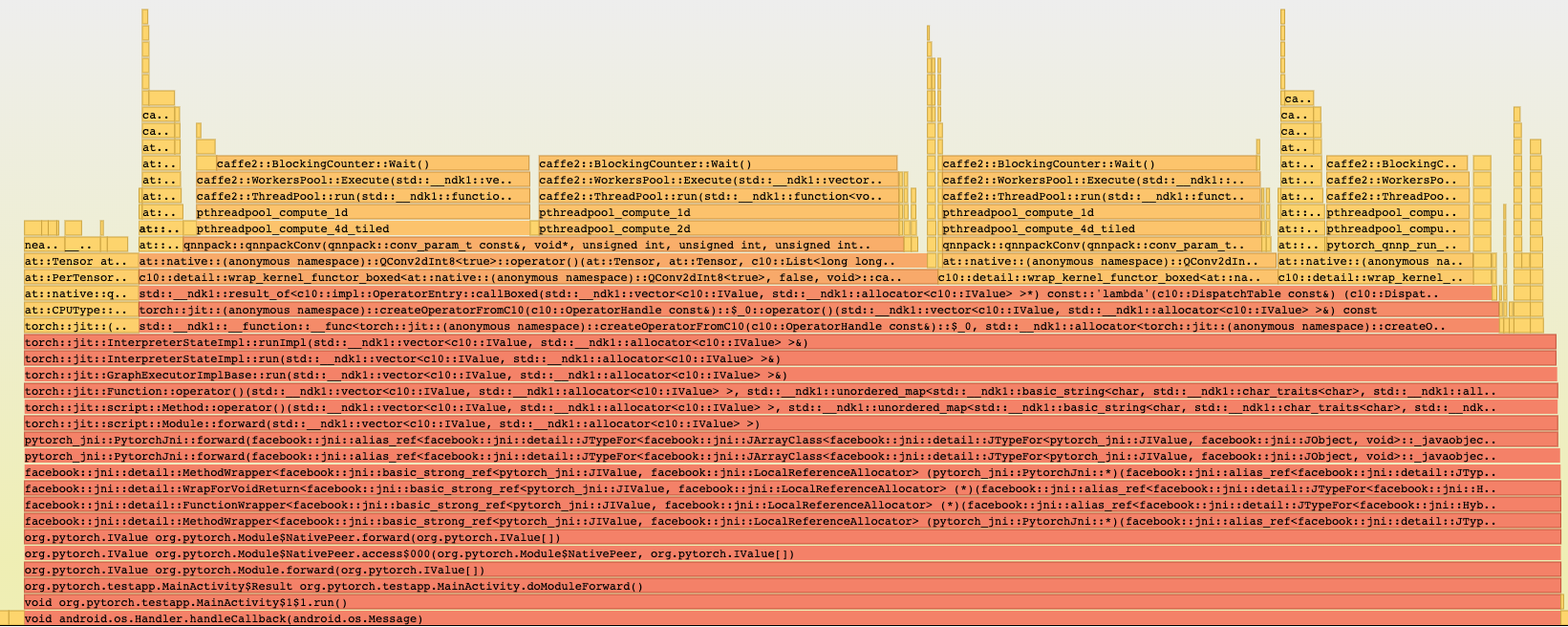
Simpleperf report has all symbols:
Pull Request resolved: https://github.com/pytorch/pytorch/pull/28406
Differential Revision: D18386622
Pulled By: IvanKobzarev
fbshipit-source-id: 3a751192bbc4bc3c6d7f126b0b55086b4d586e7a
|
||
|---|---|---|
| .. | ||
| appveyor | ||
| fbcode-dev-setup | ||
| model_zoo | ||
| onnx | ||
| add_apache_header.sh | ||
| apache_header.txt | ||
| apache_python.txt | ||
| build_android.sh | ||
| build_host_protoc.sh | ||
| build_ios.sh | ||
| build_local.sh | ||
| build_mobile.sh | ||
| build_pytorch_android.sh | ||
| build_raspbian.sh | ||
| build_tegra_x1.sh | ||
| build_tizen.sh | ||
| build_windows.bat | ||
| diagnose_protobuf.py | ||
| get_python_cmake_flags.py | ||
| proto.ps1 | ||
| read_conda_versions.sh | ||
| README.md | ||
| remove_apache_header.sh | ||
| run_mobilelab.py | ||
| temp.sh | ||
| xcode_build.rb | ||

This directory contains the useful tools.
build_android.sh
This script is to build PyTorch/Caffe2 library for Android. Take the following steps to start the build:
- set ANDROID_NDK to the location of ndk
export ANDROID_NDK=YOUR_NDK_PATH
- run build_android.sh
#in your PyTorch root directory
bash scripts/build_android.sh
If succeeded, the libraries and headers would be generated to build_android/install directory. You can then copy these files from build_android/install to your Android project for further usage.
You can also override the cmake flags via command line, e.g., following command will also compile the executable binary files:
bash scripts/build_android.sh -DBUILD_BINARY=ON
build_ios.sh
This script is to build PyTorch/Caffe2 library for iOS, and can only be performed on macOS. Take the following steps to start the build:
- Install Xcode from App Store, and configure "Command Line Tools" properly on Xcode.
- Install the dependencies:
brew install cmake automake libtool
- run build_ios.sh
#in your PyTorch root directory
bash scripts/build_ios.sh
If succeeded, the libraries and headers would be generated to build_ios/install directory. You can then copy these files to your Xcode project for further usage.