mirror of
https://github.com/zebrajr/pytorch.git
synced 2025-12-06 12:20:52 +01:00
 14f7bf0629
Summary: Pull Request resolved: https://github.com/pytorch/pytorch/pull/51419 ## Summary 1. Add an option `BUILD_LITE_INTERPRETER` in `caffe2/CMakeLists.txt` and set `OFF` as default. 2. Update 'build_android.sh' with an argument to swtich `BUILD_LITE_INTERPRETER`, 'OFF' as default. 3. Add a mini demo app `lite_interpreter_demo` linked with `libtorch` library, which can be used for quick test. ## Test Plan Built lite interpreter version of libtorch and test with Image Segmentation demo app ([android version](https://github.com/pytorch/android-demo-app/tree/master/ImageSegmentation)/[ios version](https://github.com/pytorch/ios-demo-app/tree/master/ImageSegmentation)) ### Android 1. **Prepare model**: Prepare the lite interpreter version of model by run the script below to generate the scripted model `deeplabv3_scripted.pt` and `deeplabv3_scripted.ptl` ``` import torch model = torch.hub.load('pytorch/vision:v0.7.0', 'deeplabv3_resnet50', pretrained=True) model.eval() scripted_module = torch.jit.script(model) # Export full jit version model (not compatible lite interpreter), leave it here for comparison scripted_module.save("deeplabv3_scripted.pt") # Export lite interpreter version model (compatible with lite interpreter) scripted_module._save_for_lite_interpreter("deeplabv3_scripted.ptl") ``` 2. **Build libtorch lite for android**: Build libtorch for android for all 4 android abis (armeabi-v7a, arm64-v8a, x86, x86_64) `BUILD_LITE_INTERPRETER=1 ./scripts/build_pytorch_android.sh`. This pr is tested on Pixel 4 emulator with x86, so use cmd `BUILD_LITE_INTERPRETER=1 ./scripts/build_pytorch_android.sh x86` to specify abi to save built time. After the build finish, it will show the library path: ``` ... BUILD SUCCESSFUL in 55s 134 actionable tasks: 22 executed, 112 up-to-date + find /Users/chenlai/pytorch/android -type f -name '*aar' + xargs ls -lah -rw-r--r-- 1 chenlai staff 13M Feb 11 11:48 /Users/chenlai/pytorch/android/pytorch_android/build/outputs/aar/pytorch_android-release.aar -rw-r--r-- 1 chenlai staff 36K Feb 9 16:45 /Users/chenlai/pytorch/android/pytorch_android_torchvision/build/outputs/aar/pytorch_android_torchvision-release.aar ``` 3. **Use the PyTorch Android libraries built from source in the ImageSegmentation app**: Create a folder 'libs' in the path, the path from repository root will be `ImageSegmentation/app/libs`. Copy `pytorch_android-release` to the path `ImageSegmentation/app/libs/pytorch_android-release.aar`. Copy 'pytorch_android_torchvision` (downloaded from [here](https://oss.sonatype.org/#nexus-search;quick~torchvision_android)) to the path `ImageSegmentation/app/libs/pytorch_android_torchvision.aar` Update the `dependencies` part of `ImageSegmentation/app/build.gradle` to ``` dependencies { implementation 'androidx.appcompat:appcompat:1.2.0' implementation 'androidx.constraintlayout:constraintlayout:2.0.2' testImplementation 'junit:junit:4.12' androidTestImplementation 'androidx.test.ext:junit:1.1.2' androidTestImplementation 'androidx.test.espresso:espresso-core:3.3.0' implementation(name:'pytorch_android-release', ext:'aar') implementation(name:'pytorch_android_torchvision', ext:'aar') implementation 'com.android.support:appcompat-v7:28.0.0' implementation 'com.facebook.fbjni:fbjni-java-only:0.0.3' } ``` Update `allprojects` part in `ImageSegmentation/build.gradle` to ``` allprojects { repositories { google() jcenter() flatDir { dirs 'libs' } } } ``` 4. **Update model loader api**: Update `ImageSegmentation/app/src/main/java/org/pytorch/imagesegmentation/MainActivity.java` by 4.1 Add new import: `import org.pytorch.LiteModuleLoader;` 4.2 Replace the way to load pytorch lite model ``` // mModule = Module.load(MainActivity.assetFilePath(getApplicationContext(), "deeplabv3_scripted.pt")); mModule = LiteModuleLoader.load(MainActivity.assetFilePath(getApplicationContext(), "deeplabv3_scripted.ptl")); ``` 5. **Test app**: Build and run the ImageSegmentation app in Android Studio, 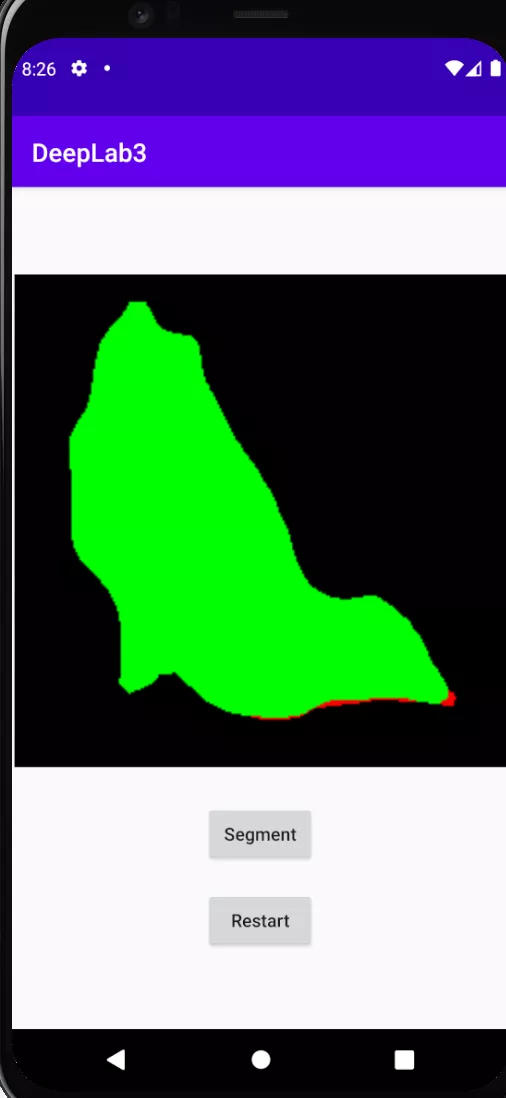 ### iOS 1. **Prepare model**: Same as Android. 2. **Build libtorch lite for ios** `BUILD_PYTORCH_MOBILE=1 IOS_PLATFORM=SIMULATOR BUILD_LITE_INTERPRETER=1 ./scripts/build_ios.sh` 3. **Remove Cocoapods from the project**: run `pod deintegrate` 4. **Link ImageSegmentation demo app with the custom built library**: Open your project in XCode, go to your project Target’s **Build Phases - Link Binaries With Libraries**, click the **+** sign and add all the library files located in `build_ios/install/lib`. Navigate to the project **Build Settings**, set the value **Header Search Paths** to `build_ios/install/include` and **Library Search Paths** to `build_ios/install/lib`. In the build settings, search for **other linker flags**. Add a custom linker flag below ``` -all_load ``` Finally, disable bitcode for your target by selecting the Build Settings, searching for Enable Bitcode, and set the value to No. ** 5. Update library and api** 5.1 Update `TorchModule.mm`` To use the custom built libraries the project, replace `#import <LibTorch/LibTorch.h>` (in `TorchModule.mm`) which is needed when using LibTorch via Cocoapods with the code below: ``` //#import <LibTorch/LibTorch.h> #include "ATen/ATen.h" #include "caffe2/core/timer.h" #include "caffe2/utils/string_utils.h" #include "torch/csrc/autograd/grad_mode.h" #include "torch/script.h" #include <torch/csrc/jit/mobile/function.h> #include <torch/csrc/jit/mobile/import.h> #include <torch/csrc/jit/mobile/interpreter.h> #include <torch/csrc/jit/mobile/module.h> #include <torch/csrc/jit/mobile/observer.h> ``` 5.2 Update `ViewController.swift` ``` // if let filePath = Bundle.main.path(forResource: // "deeplabv3_scripted", ofType: "pt"), // let module = TorchModule(fileAtPath: filePath) { // return module // } else { // fatalError("Can't find the model file!") // } if let filePath = Bundle.main.path(forResource: "deeplabv3_scripted", ofType: "ptl"), let module = TorchModule(fileAtPath: filePath) { return module } else { fatalError("Can't find the model file!") } ``` ### Unit test Add `test/cpp/lite_interpreter`, with one unit test `test_cores.cpp` and a light model `sequence.ptl` to test `_load_for_mobile()`, `bc.find_method()` and `bc.forward()` functions. ### Size: **With the change:** Android: x86: `pytorch_android-release.aar` (**13.8 MB**) IOS: `pytorch/build_ios/install/lib` (lib: **66 MB**): ``` (base) chenlai@chenlai-mp lib % ls -lh total 135016 -rw-r--r-- 1 chenlai staff 3.3M Feb 15 20:45 libXNNPACK.a -rw-r--r-- 1 chenlai staff 965K Feb 15 20:45 libc10.a -rw-r--r-- 1 chenlai staff 4.6K Feb 15 20:45 libclog.a -rw-r--r-- 1 chenlai staff 42K Feb 15 20:45 libcpuinfo.a -rw-r--r-- 1 chenlai staff 39K Feb 15 20:45 libcpuinfo_internals.a -rw-r--r-- 1 chenlai staff 1.5M Feb 15 20:45 libeigen_blas.a -rw-r--r-- 1 chenlai staff 148K Feb 15 20:45 libfmt.a -rw-r--r-- 1 chenlai staff 44K Feb 15 20:45 libpthreadpool.a -rw-r--r-- 1 chenlai staff 166K Feb 15 20:45 libpytorch_qnnpack.a -rw-r--r-- 1 chenlai staff 384B Feb 15 21:19 libtorch.a -rw-r--r-- 1 chenlai staff **60M** Feb 15 20:47 libtorch_cpu.a ``` `pytorch/build_ios/install`: ``` (base) chenlai@chenlai-mp install % du -sh * 14M include 66M lib 2.8M share ``` **Master (baseline):** Android: x86: `pytorch_android-release.aar` (**16.2 MB**) IOS: `pytorch/build_ios/install/lib` (lib: **84 MB**): ``` (base) chenlai@chenlai-mp lib % ls -lh total 172032 -rw-r--r-- 1 chenlai staff 3.3M Feb 17 22:18 libXNNPACK.a -rw-r--r-- 1 chenlai staff 969K Feb 17 22:18 libc10.a -rw-r--r-- 1 chenlai staff 4.6K Feb 17 22:18 libclog.a -rw-r--r-- 1 chenlai staff 42K Feb 17 22:18 libcpuinfo.a -rw-r--r-- 1 chenlai staff 1.5M Feb 17 22:18 libeigen_blas.a -rw-r--r-- 1 chenlai staff 44K Feb 17 22:18 libpthreadpool.a -rw-r--r-- 1 chenlai staff 166K Feb 17 22:18 libpytorch_qnnpack.a -rw-r--r-- 1 chenlai staff 384B Feb 17 22:19 libtorch.a -rw-r--r-- 1 chenlai staff 78M Feb 17 22:19 libtorch_cpu.a ``` `pytorch/build_ios/install`: ``` (base) chenlai@chenlai-mp install % du -sh * 14M include 84M lib 2.8M share ``` Test Plan: Imported from OSS Reviewed By: iseeyuan Differential Revision: D26518778 Pulled By: cccclai fbshipit-source-id: 4503ffa1f150ecc309ed39fb0549e8bd046a3f9c

177 lines
6.1 KiB
Bash
Executable File
177 lines
6.1 KiB
Bash
Executable File
#!/bin/bash
|
|
##############################################################################
|
|
# Example command to build the android target.
|
|
##############################################################################
|
|
#
|
|
# This script shows how one can build a Caffe2 binary for the Android platform
|
|
# using android-cmake. A few notes:
|
|
#
|
|
# (1) This build also does a host build for protobuf. You will need autoconf
|
|
# to carry out this. If autoconf is not possible, you will need to provide
|
|
# a pre-built protoc binary that is the same version as the protobuf
|
|
# version under third_party.
|
|
# If you are building on Mac, you might need to install autotool and
|
|
# libtool. The easiest way is via homebrew:
|
|
# brew install automake
|
|
# brew install libtool
|
|
# (2) You will need to have android ndk installed. The current script assumes
|
|
# that you set ANDROID_NDK to the location of ndk.
|
|
# (3) The toolchain and the build target platform can be specified with the
|
|
# cmake arguments below. For more details, check out android-cmake's doc.
|
|
|
|
set -e
|
|
|
|
# Android specific flags
|
|
if [ -z "$ANDROID_ABI" ]; then
|
|
ANDROID_ABI="armeabi-v7a with NEON"
|
|
fi
|
|
ANDROID_NATIVE_API_LEVEL="21"
|
|
echo "Build with ANDROID_ABI[$ANDROID_ABI], ANDROID_NATIVE_API_LEVEL[$ANDROID_NATIVE_API_LEVEL]"
|
|
|
|
CAFFE2_ROOT="$( cd "$(dirname "$0")"/.. ; pwd -P)"
|
|
if [ -z "$ANDROID_NDK" ]; then
|
|
echo "ANDROID_NDK not set; please set it to the Android NDK directory"
|
|
exit 1
|
|
fi
|
|
|
|
if [ ! -d "$ANDROID_NDK" ]; then
|
|
echo "ANDROID_NDK not a directory; did you install it under $ANDROID_NDK?"
|
|
exit 1
|
|
fi
|
|
|
|
if [ -z "$PYTHON" ]; then
|
|
PYTHON=python
|
|
PYTHON_VERSION_MAJOR=$($PYTHON -c 'import sys; print(sys.version_info[0])')
|
|
if [ "${PYTHON_VERSION_MAJOR}" -le 2 ]; then
|
|
echo "Default python executable is Python-2, trying to use python3 alias"
|
|
PYTHON=python3
|
|
fi
|
|
fi
|
|
|
|
ANDROID_NDK_PROPERTIES="$ANDROID_NDK/source.properties"
|
|
[ -f "$ANDROID_NDK_PROPERTIES" ] && ANDROID_NDK_VERSION=$(sed -n 's/^Pkg.Revision[^=]*= *\([0-9]*\)\..*$/\1/p' "$ANDROID_NDK_PROPERTIES")
|
|
|
|
echo "Bash: $(/bin/bash --version | head -1)"
|
|
echo "Python: $($PYTHON -c 'import sys; print(sys.version)')"
|
|
echo "Caffe2 path: $CAFFE2_ROOT"
|
|
echo "Using Android NDK at $ANDROID_NDK"
|
|
echo "Android NDK version: $ANDROID_NDK_VERSION"
|
|
|
|
CMAKE_ARGS=()
|
|
|
|
if [ -z "${BUILD_CAFFE2_MOBILE:-}" ]; then
|
|
# Build PyTorch mobile
|
|
CMAKE_ARGS+=("-DCMAKE_PREFIX_PATH=$($PYTHON -c 'from distutils.sysconfig import get_python_lib; print(get_python_lib())')")
|
|
CMAKE_ARGS+=("-DPYTHON_EXECUTABLE=$($PYTHON -c 'import sys; print(sys.executable)')")
|
|
CMAKE_ARGS+=("-DBUILD_CUSTOM_PROTOBUF=OFF")
|
|
# custom build with selected ops
|
|
if [ -n "${SELECTED_OP_LIST}" ]; then
|
|
SELECTED_OP_LIST="$(cd $(dirname $SELECTED_OP_LIST); pwd -P)/$(basename $SELECTED_OP_LIST)"
|
|
echo "Choose SELECTED_OP_LIST file: $SELECTED_OP_LIST"
|
|
if [ ! -r ${SELECTED_OP_LIST} ]; then
|
|
echo "Error: SELECTED_OP_LIST file ${SELECTED_OP_LIST} not found."
|
|
exit 1
|
|
fi
|
|
CMAKE_ARGS+=("-DSELECTED_OP_LIST=${SELECTED_OP_LIST}")
|
|
fi
|
|
else
|
|
# Build Caffe2 mobile
|
|
CMAKE_ARGS+=("-DBUILD_CAFFE2_MOBILE=ON")
|
|
# Build protobuf from third_party so we have a host protoc binary.
|
|
echo "Building protoc"
|
|
$CAFFE2_ROOT/scripts/build_host_protoc.sh
|
|
# Use locally built protoc because we'll build libprotobuf for the
|
|
# target architecture and need an exact version match.
|
|
CMAKE_ARGS+=("-DCAFFE2_CUSTOM_PROTOC_EXECUTABLE=$CAFFE2_ROOT/build_host_protoc/bin/protoc")
|
|
fi
|
|
|
|
# If Ninja is installed, prefer it to Make
|
|
if [ -x "$(command -v ninja)" ]; then
|
|
CMAKE_ARGS+=("-GNinja")
|
|
fi
|
|
|
|
# Use android-cmake to build Android project from CMake.
|
|
CMAKE_ARGS+=("-DCMAKE_TOOLCHAIN_FILE=$ANDROID_NDK/build/cmake/android.toolchain.cmake")
|
|
|
|
if [ -z "$BUILD_MOBILE_BENCHMARK" ]; then
|
|
BUILD_MOBILE_BENCHMARK=0
|
|
fi
|
|
|
|
if [ -z "$BUILD_MOBILE_TEST" ]; then
|
|
BUILD_MOBILE_TEST=0
|
|
fi
|
|
# Don't build artifacts we don't need
|
|
CMAKE_ARGS+=("-DBUILD_TEST=OFF")
|
|
CMAKE_ARGS+=("-DBUILD_BINARY=OFF")
|
|
|
|
# If there exists env variable and it equals to 1, build lite interpreter.
|
|
# cmd: BUILD_LITE_INTERPRETER=1 ./scripts/build_android.sh
|
|
if [ "${BUILD_LITE_INTERPRETER}" == 1 ]; then
|
|
CMAKE_ARGS+=("-DBUILD_LITE_INTERPRETER=ON")
|
|
else
|
|
CMAKE_ARGS+=("-DBUILD_LITE_INTERPRETER=OFF")
|
|
fi
|
|
CMAKE_ARGS+=("-DBUILD_MOBILE_BENCHMARK=$BUILD_MOBILE_BENCHMARK")
|
|
CMAKE_ARGS+=("-DBUILD_MOBILE_TEST=$BUILD_MOBILE_TEST")
|
|
CMAKE_ARGS+=("-DBUILD_PYTHON=OFF")
|
|
CMAKE_ARGS+=("-DBUILD_SHARED_LIBS=OFF")
|
|
if (( "${ANDROID_NDK_VERSION:-0}" < 18 )); then
|
|
CMAKE_ARGS+=("-DANDROID_TOOLCHAIN=gcc")
|
|
else
|
|
CMAKE_ARGS+=("-DANDROID_TOOLCHAIN=clang")
|
|
fi
|
|
# Disable unused dependencies
|
|
CMAKE_ARGS+=("-DUSE_CUDA=OFF")
|
|
CMAKE_ARGS+=("-DUSE_GFLAGS=OFF")
|
|
CMAKE_ARGS+=("-DUSE_OPENCV=OFF")
|
|
CMAKE_ARGS+=("-DUSE_LMDB=OFF")
|
|
CMAKE_ARGS+=("-DUSE_LEVELDB=OFF")
|
|
CMAKE_ARGS+=("-DUSE_MPI=OFF")
|
|
CMAKE_ARGS+=("-DUSE_OPENMP=OFF")
|
|
# Only toggle if VERBOSE=1
|
|
if [ "${VERBOSE:-}" == '1' ]; then
|
|
CMAKE_ARGS+=("-DCMAKE_VERBOSE_MAKEFILE=1")
|
|
fi
|
|
|
|
# Android specific flags
|
|
CMAKE_ARGS+=("-DANDROID_NDK=$ANDROID_NDK")
|
|
CMAKE_ARGS+=("-DANDROID_ABI=$ANDROID_ABI")
|
|
CMAKE_ARGS+=("-DANDROID_NATIVE_API_LEVEL=$ANDROID_NATIVE_API_LEVEL")
|
|
CMAKE_ARGS+=("-DANDROID_CPP_FEATURES=rtti exceptions")
|
|
if [ "${ANDROID_STL_SHARED:-}" == '1' ]; then
|
|
CMAKE_ARGS+=("-DANDROID_STL=c++_shared")
|
|
fi
|
|
if [ "${ANDROID_DEBUG_SYMBOLS:-}" == '1' ]; then
|
|
CMAKE_ARGS+=("-DANDROID_DEBUG_SYMBOLS=1")
|
|
fi
|
|
|
|
if [ -n "${USE_VULKAN}" ]; then
|
|
CMAKE_ARGS+=("-DUSE_VULKAN=ON")
|
|
fi
|
|
|
|
# Use-specified CMake arguments go last to allow overridding defaults
|
|
CMAKE_ARGS+=($@)
|
|
|
|
# Now, actually build the Android target.
|
|
BUILD_ROOT=${BUILD_ROOT:-"$CAFFE2_ROOT/build_android"}
|
|
INSTALL_PREFIX=${BUILD_ROOT}/install
|
|
mkdir -p $BUILD_ROOT
|
|
cd $BUILD_ROOT
|
|
cmake "$CAFFE2_ROOT" \
|
|
-DCMAKE_INSTALL_PREFIX=$INSTALL_PREFIX \
|
|
-DCMAKE_BUILD_TYPE=Release \
|
|
"${CMAKE_ARGS[@]}"
|
|
|
|
# Cross-platform parallel build
|
|
if [ -z "$MAX_JOBS" ]; then
|
|
if [ "$(uname)" == 'Darwin' ]; then
|
|
MAX_JOBS=$(sysctl -n hw.ncpu)
|
|
else
|
|
MAX_JOBS=$(nproc)
|
|
fi
|
|
fi
|
|
|
|
echo "Will install headers and libs to $INSTALL_PREFIX for further Android project usage."
|
|
cmake --build . --target install -- "-j${MAX_JOBS}"
|
|
echo "Installation completed, now you can copy the headers/libs from $INSTALL_PREFIX to your Android project directory."
|